Confidential Containers protect Kubernetes pods and their data in use by running containers inside hardware-backed Trusted Execution Environments (TEEs). The CNCF Confidential Containers (CoCo) project combines Kata Containers, confidential virtual machines, remote attestation, and secret delivery into a cloud-native deployment model.
What Are Confidential Containers?
Confidential containers is the generic term for containers deployed inside Trusted Execution Environments.
CNCF Confidential Containers (CoCo) Project
The CNCF CoCo project provides a common foundation for deploying a pod inside a CVM (using Kata Containers) on any Kubernetes cluster, and includes Trustee as the remote attestation service.
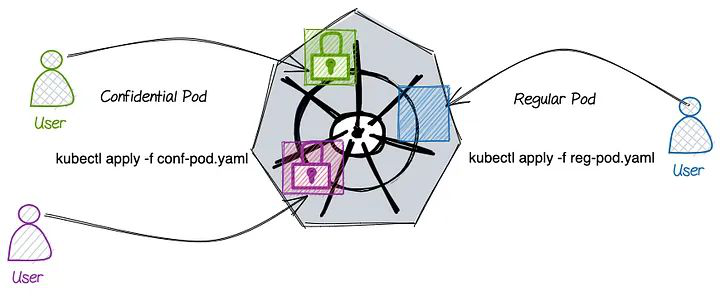
CoCo provides two deployment approaches:
Confidential containers using VM-based TEEs on a local hypervisor - the hypervisor (e.g., QEMU) runs on the Kubernetes worker node and the Confidential VM runs on the same worker node.
Confidential containers using VM-based TEEs on a remote hypervisor (peer-pods) — the Confidential VM runs on an external cloud instance provisioned via cloud APIs by the cloud-api-adaptor (CAA); the worker node does not run a hypervisor.
Kata Containers Primer
CoCo is built on Kata Containers, so a working picture of Kata is essential before the rest of this chapter. If you already run Kata, skip ahead.
The core idea: Kata is an OCI-compatible container runtime that runs each Kubernetes pod inside its own lightweight virtual machine instead of a shared-kernel namespace sandbox. The workload gets a dedicated guest kernel, so a container escape ends inside the VM, not on the node. For example, CVE-2024-21626 (Leaky Vessels) allowed a container process to gain access to the host filesystem by manipulating runc’s working-directory handling. With Kata, the same exploit only reaches the disposable guest VM’s filesystem; the worker node’s kernel and filesystem are never exposed to the container process.
How a Kata pod starts:
A pod’s
runtimeClassName: kataroutes the CRI (Container Runtime Interface) request from containerd/CRI-O to the Kata shim (containerd-shim-kata-v2) instead of the default runc handler. The shim is a small process on the worker node that acts as a translator between containerd/CRI-O and the VM, making a virtual machine look like an ordinary container to the rest of Kubernetes.The shim launches a hypervisor (QEMU, Cloud Hypervisor, or Firecracker) that boots a minimal VM: a stripped-down guest kernel and a small rootfs image containing the kata-agent.
The shim talks to kata-agent over a vsock channel (a host-to-guest socket that needs no networking). The agent creates and manages the pod’s containers inside the VM.
To Kubernetes, none of this is visible: the kubelet sees an ordinary pod. One pod = one VM; all containers of that pod share the same guest.
Two properties of this architecture matter for everything that follows:
The VM boundary is a natural TEE boundary. Because the pod already lives in a VM, swapping that VM for a confidential VM (SEV-SNP, TDX) is an evolution of the architecture, not a redesign.
kata-agent is the control plane’s only door into the guest. Every operation Kubernetes performs on the pod (start container, exec, resize) arrives as an agent API request, a single choke point where CoCo later attaches policy enforcement.
For the full architecture, see the Kata Containers documentation.
From Kata to CoCo: The Key Difference
Kata Containers protects the host from the workload.
CoCo protects the workload from the host.
| Kata Containers | CoCo | |
|---|---|---|
| Threat model | Protect host from the workload | Protect workload from the host |
| Who’s protected | Cluster infra | The workload |
| Image download | May be on the worker node or inside the VM | Always inside the CVM |
| TEE required | No | Yes |
| Attestation | No | Yes |
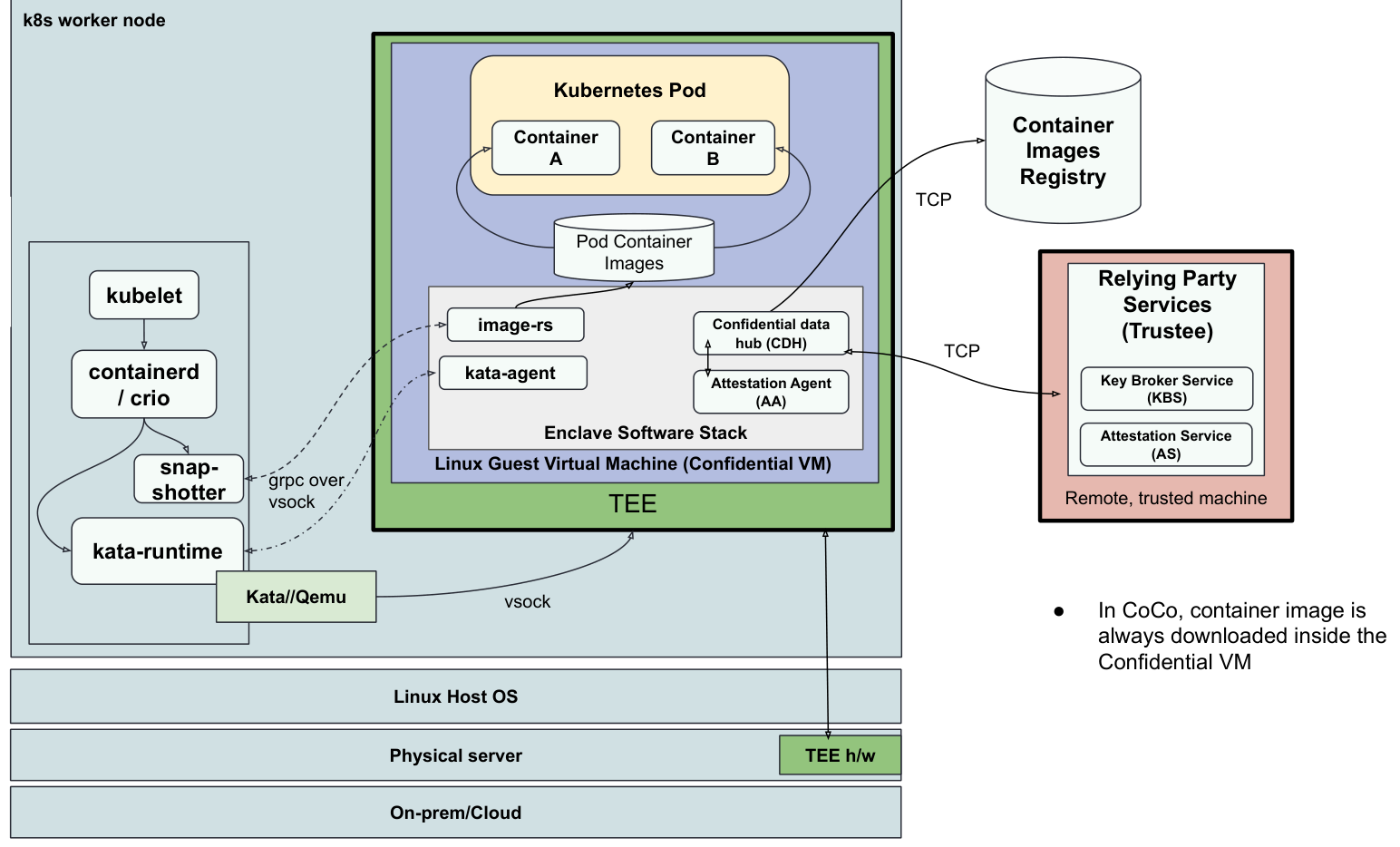
Architecture: CoCo/bare-metal (Local Hypervisor)
The Confidential VM (CVM) runs on the worker node. Inside the CVM: kata-agent manages the lifecycle of the pod (containers), image-rs (the container image management library from guest-components, linked into kata-agent) downloads the container images, the Confidential Data Hub (CDH) serves as the secret retrieval proxy, and the Attestation Agent (AA) handles the attestation process. Container images are always downloaded inside the CVM, never on the host.
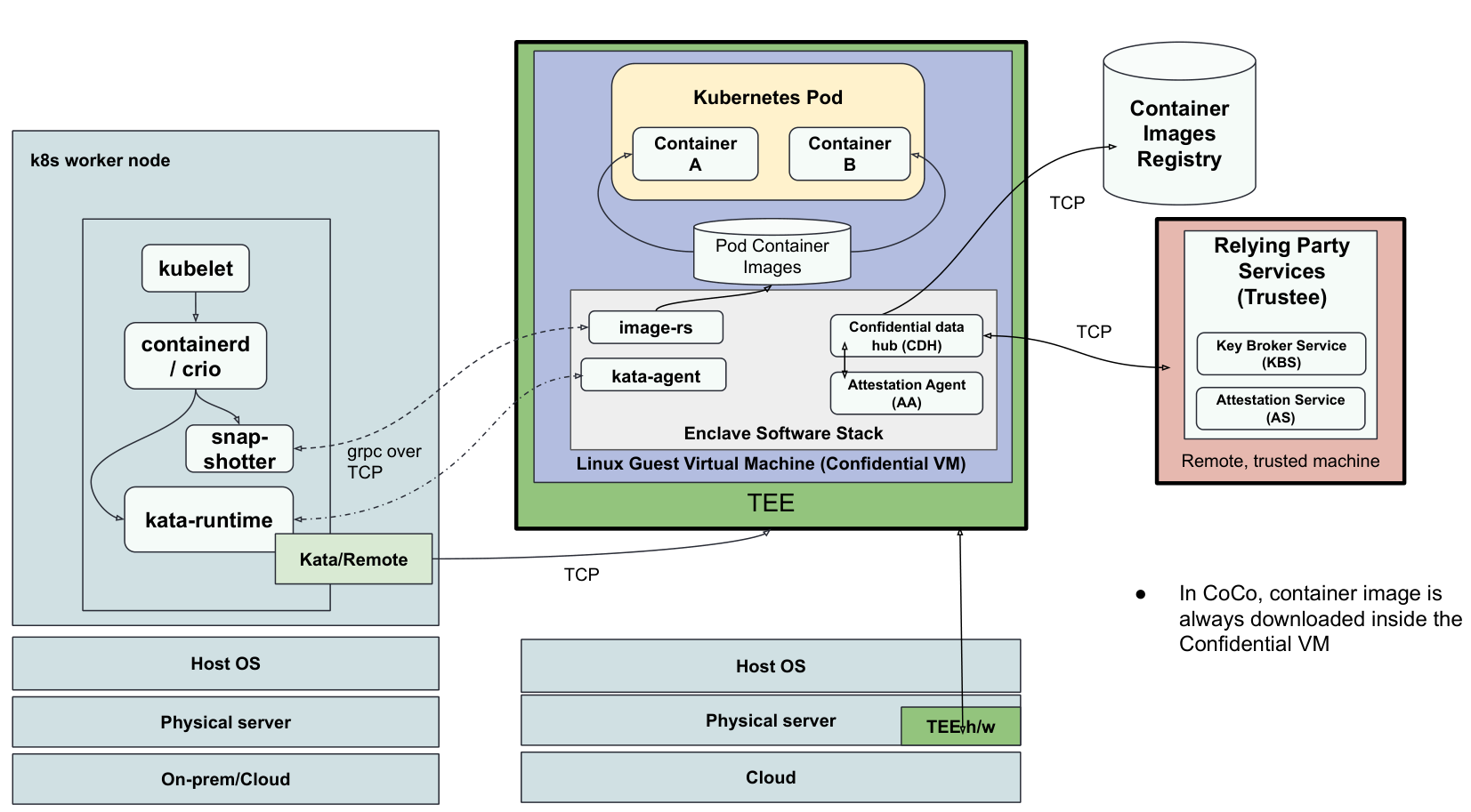
Architecture: CoCo/peer-pods (Remote Hypervisor)
The Confidential VM runs external to the worker node. The worker node hosts only the kata-runtime and cloud-api-adaptor.
Pod Startup, End to End
Putting the pieces together — what happens when you kubectl apply a pod with a CoCo runtime class (bare-metal case):
Scheduling and runtime dispatch. The scheduler places the pod; kubelet asks containerd to create it. The pod’s
runtimeClassName(e.g.,kata-qemu-snp) routes the request to the Kata shim instead of the default runtime.CVM launch. The Kata shim starts QEMU, which creates a confidential VM from the measured guest components: firmware, kernel, initramfs, and the dm-verity-protected rootfs. The pod’s initdata (KBS URL, agent policy; see below) is passed in, and its digest is bound into the TEE’s launch state.
Hardware measurement. The TEE hardware (AMD SP / TDX module) measures the launch. From this point, anything the host tampers with will surface as an attestation mismatch.
Guest-side image pull. containerd delegates image handling to the nydus snapshotter, so layers are not pulled on the host. Inside the CVM, kata-agent (via image-rs) pulls the container image, verifying signatures and decrypting layers according to policy. Any keys needed for this are requested through the CDH, which triggers attestation against Trustee.
Policy-gated API. Every request the control plane sends to kata-agent (start container, exec, set env) is first evaluated against the agent’s OPA policy. Requests the policy forbids, such as
exec, are rejected regardless of who asks.Containers start inside the CVM. Further secrets are fetched lazily via the CDH API as the workload requests them.
The same flow applies to peer-pods, except the CVM is created via cloud APIs (by the cloud-api-adaptor) instead of a local QEMU.
Configuring Trust: initdata and Agent Policy
A CoCo CVM image is generic: it must not embed deployment-specific configuration, or every deployment would need its own measured image. Initdata solves this: a small, structured document (the KBS URL, Attestation Agent and CDH configuration, and the agent’s OPA policy) supplied per-pod at creation time. The recommended encoding is TOML, with three top-level fields: version, algorithm (the hash used for digest verification), and data (a key-value map of configuration entries):
algorithm = "sha384"
version = "0.1.0"

[data]
"aa.toml" = '''
[token_configs.kbs]
url = "http://172.18.0.1:8080"
'''
The host delivers initdata to the guest as a virtio block device. On the host side, kata-runtime gzip-compresses the TOML and writes it into a raw disk image that is attached to the VM. Inside the guest, kata-agent scans block devices for a magic header, decompresses the payload, parses the TOML, and writes the configuration files (aa.toml, cdh.toml, policy.rego) for the guest components.
The host is untrusted, so initdata is anchored to the hardware: its digest is bound into the TEE’s launch state (the HOSTDATA field on SEV-SNP, MRCONFIGID on Intel TDX) and therefore appears in the attestation Evidence. The verifier checks it like any other measurement. A host that swaps the policy for a permissive one, or points the agent at a rogue KBS, changes the digest and breaks attestation.
The agent policy is a set of rules written in OPA’s Rego language. kata-agent checks this policy before executing any command it receives from the Kubernetes control plane (kubelet, API server). Commands that manage the pod lifecycle, such as starting or stopping containers, are allowed. But commands that would expose workload data to a cluster administrator are denied inside the TEE. For example, kubectl exec (which opens a shell inside the container) and kubectl logs (which reads container output) are blocked by default. This is what makes the Kubernetes control plane untrusted but still functional: it can manage the pod without being able to inspect what runs inside it. Lab 3 shows the default policy cococtl generates.
Protecting Container Images
In a standard Kubernetes setup, the host (containerd/CRI-O) downloads container images, which means it can see the unencrypted image layers: application code, configuration, model weights, and anything else packaged in the image. With CoCo, images are pulled inside the CVM (as described in step 4 above), so the host never sees the image content. Two complementary mechanisms extend this protection:
Signed images. Image signature verification (e.g., cosign signatures) runs inside the CVM, with the signature policy and trusted keys fetched from Trustee after attestation. The host cannot substitute a tampered image, because verification happens behind the TEE boundary against attested policy.
Encrypted images. For proprietary code or models, images can be encrypted (OCI image encryption/ocicrypt). The registry, the network, and the host only ever see ciphertext; the decryption key is released by Trustee to attested CVMs only. This is the standard pattern for the “protect model weights from the provider” use case in Chapter 3.
Both policies are themselves resources fetched via attestation, so the entire image trust chain is rooted in the hardware.
CoCo Threat Model
The untrusted components include the host OS, hypervisor, cloud provider software, other VMs on the same host, other processes on the worker node, the Kubernetes control plane (API server, etcd, scheduler), and the node agents (kubelet, containerd/CRI-O).
Application code vulnerabilities, availability attacks, and physical attacks are out of scope.
What CoCo Does Not Hide
CoCo protects the contents of the workload. A realistic deployment assessment should also note what remains visible to the untrusted infrastructure and cluster:
Kubernetes metadata: pod names, labels, annotations, namespaces, and the full pod spec live in etcd. Don’t put sensitive values in metadata or plain env vars.
Image references: the host and registry see which images are pulled (names and sizes), even when content is encrypted.
Traffic and resource patterns: the host observes network flow metadata, CPU/memory usage, and timing. Application-layer traffic must still be encrypted (TLS) since it leaves the TEE.
Availability: the cluster admin can still delete, reschedule, or refuse to run pods. CC protects confidentiality and integrity, never availability.
Attestation in Confidential Containers
In Confidential Containers, attestation is framed as resource requests: before Trustee grants access to a resource (such as a decryption key or sealed secret), it determines whether the requester — the TEE — is trustworthy.
Attestation in CoCo happens lazily — only when an operation first depends on a resource. This might occur:
Before container startup (e.g., to retrieve an image decryption key or a sealed secret)
Or later in the workload lifecycle
A consequence of lazy attestation: a workload that never requests a resource is never attested. A running pod is not, by itself, proof that attestation happened. Conversely, successfully receiving a resource (especially a secret known only to Trustee) implies attestation has already occurred. If you need a hard guarantee that a workload attested before starting, gate startup on a secret retrieval (for example, via an init container that fetches a resource from Trustee).
Integrity Protection for CoCo CVM Images
A CoCo CVM boots from several components: the kernel (the OS core running inside the VM), the kernel command line (boot parameters passed to the kernel), the initramfs (a small temporary filesystem loaded into memory at boot to initialize the VM before the main filesystem is available), and the rootfs (the main read-only filesystem containing the guest OS).
The rootfs is protected by dm-verity, a Linux kernel feature that uses a hash tree to verify every disk block on read, making any tampering detectable. The kernel, kernel command line, and initramfs are measured and included in the attestation report. Any change to the CVM image changes the measurements, causing attestation to fail.
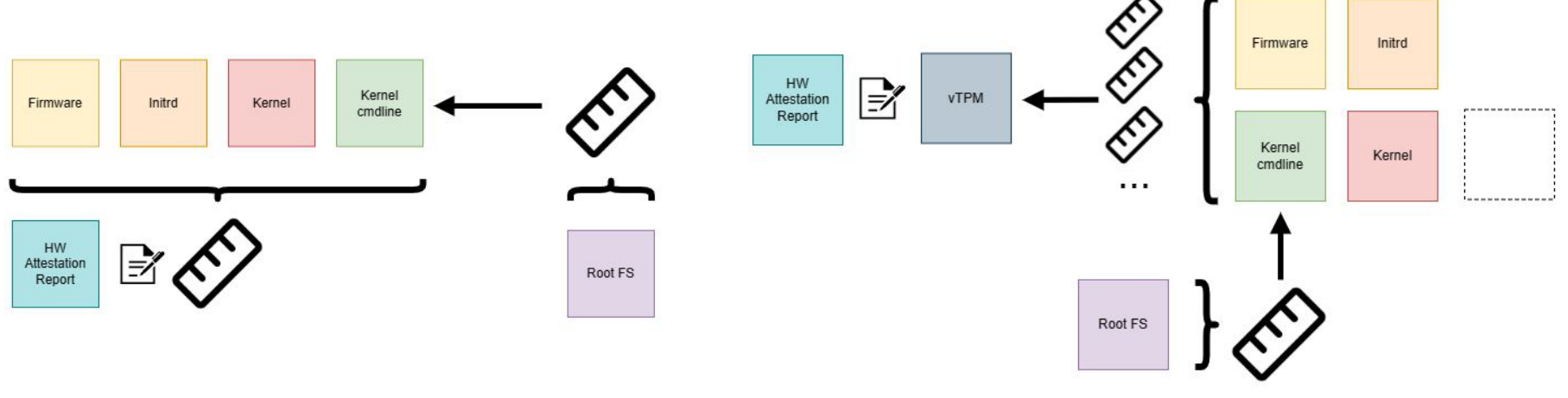
Ref: Building trust into OS images
CoCo CVM Requirements
Following are the key CVM requirements for CoCo:
Read-only rootfs with integrity protection (dm-verity/fs-verity + composefs)
Memory-backed filesystem or LUKS-encrypted ephemeral disk for read-write storage (container images)
Read-Only Rootfs with Integrity Protection
dm-verity — Linux kernel feature providing transparent integrity checking of block devices
fs-verity — file-level integrity verification
composefs — combining read-only fs-verity protected files with a mutable upper layer
Encrypted Ephemeral Disk
For container image layers and ephemeral writes, a LUKS-encrypted disk uses an ephemeral key generated inside the TEE at runtime — never persisted, never leaving the TEE.