This lab runs a Kubernetes cluster on a standard VM and connects it to an Azure Confidential VM as a peer pod. Workload containers execute inside the hardware-backed SEV-SNP CVM, not on the K8s node. The BYOM (Bring Your Own Machine) provider of cloud-api-adaptor (CAA) manages the pre-existing CVM pool and delivers pod configuration to the CVM via SFTP.
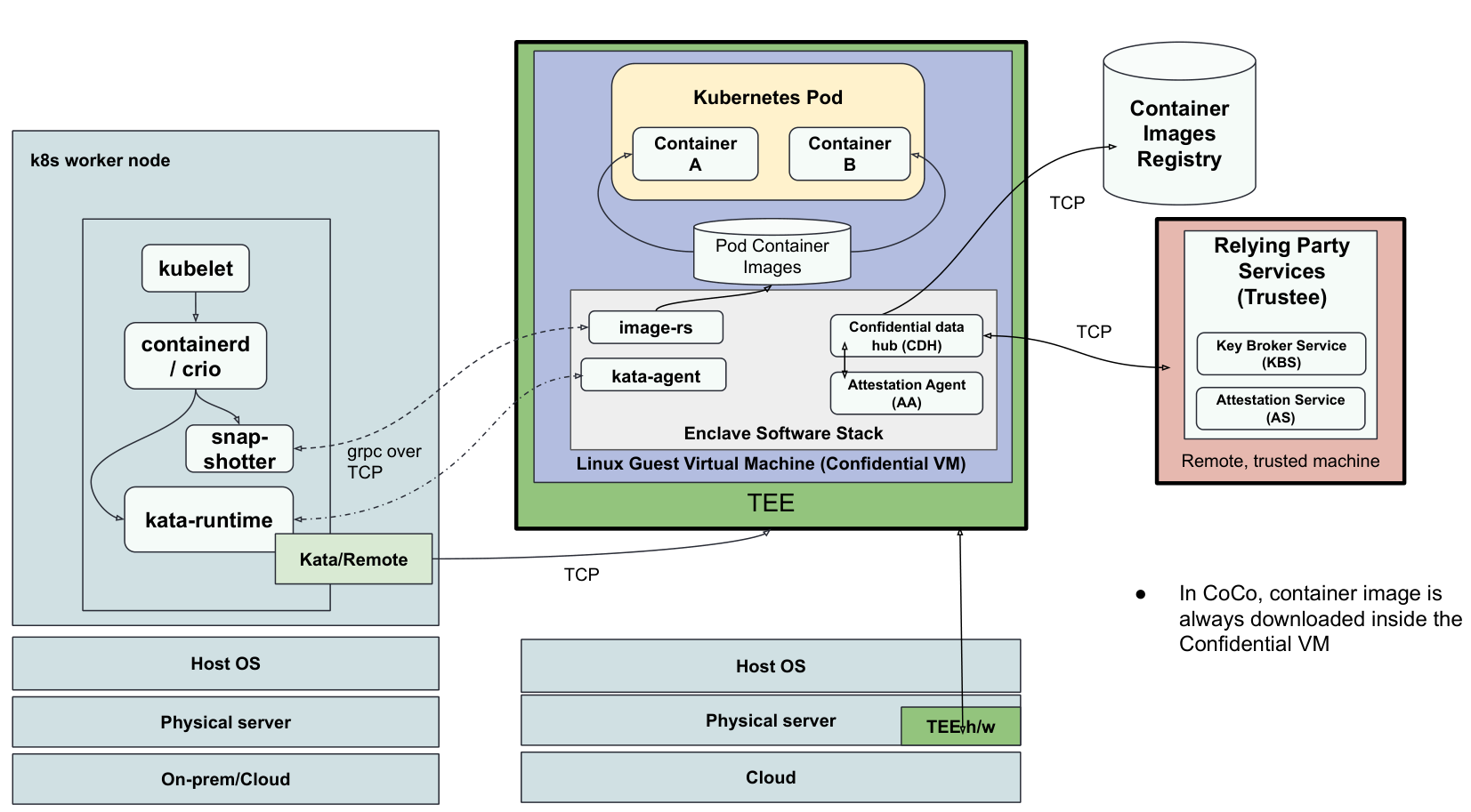
The lab uses two Azure VMs in the same VNet:
| VM | Role | Size | Image |
|---|---|---|---|
k8s-vm | K8s control plane + CAA + build host | Standard_D4s_v3 | Ubuntu 26.04 |
cvm-peer | Peer pod CVM (workloads run here) | Standard_DC2as_v5 | Ubuntu 26.04 Pro CVM |
Prerequisites
Azure subscription with quota for DCasv5-series (CVM) and D4s_v3 in East US or West Europe
Azure CLI installed and authenticated (
az login)(Optional) A container registry you can push to, only needed if you build the BYOM images yourself instead of using the pre-built ones
Estimated Cost
| Resource | Size | Approx. cost |
|---|---|---|
k8s-vm | Standard_D4s_v3 | ~$0.19/hr |
cvm-peer | Standard_DC2as_v5 | ~$0.10/hr |
| Total | ~$0.29/hr |
Step 1: Provision Infrastructure
export LOCATION="eastus"
export RG="byom-lab"

az group create --name $RG --location $LOCATION

az vm create --resource-group $RG --name k8s-vm \
  --image "Canonical:ubuntu-26_04-lts:server:latest" \
  --size Standard_D4s_v3 --location $LOCATION \
  --admin-username azureuser --generate-ssh-keys \
  --vnet-name byom-lab-vnet --subnet byom-lab-subnet

az vm create --resource-group $RG --name cvm-peer \
  --image "Canonical:ubuntu-26_04-lts:pro-server-cvm:latest" \
  --size Standard_DC2as_v5 --location $LOCATION \
  --security-type ConfidentialVM \
  --os-disk-security-encryption-type VMGuestStateOnly \
  --enable-vtpm true --enable-secure-boot true \
  --admin-username azureuser --generate-ssh-keys \
  --vnet-name byom-lab-vnet --subnet byom-lab-subnet

# Allow SFTP (port 22) from the K8s VM to the CVM
az network nsg rule create --resource-group $RG \
  --nsg-name cvm-peerNSG --name allow-ssh-from-k8s \
  --priority 1010 --protocol Tcp --destination-port-ranges 22 --access Allow \
  --source-address-prefixes VirtualNetwork
Capture IPs for use throughout the lab:
export K8S_PUBLIC_IP=$(az vm show -g $RG -n k8s-vm --query publicIps -d -o tsv)
export CVM_PUBLIC_IP=$(az vm show -g $RG -n cvm-peer --query publicIps -d -o tsv)
export CVM_PRIVATE_IP=$(az vm show -g $RG -n cvm-peer --query privateIps -d -o tsv)
echo "k8s-vm:   $K8S_PUBLIC_IP"
echo "cvm-peer: $CVM_PUBLIC_IP (private: $CVM_PRIVATE_IP)"
Step 2: Setup BYOM SSH Keys
The SSH keys allow CAA running in k8s-vm to reach cvm-peer via SFTP:
ssh-keygen -f ./byom-id_rsa -N "" -t rsa -C "byom-peerpod"Copy the BYOM public key to k8s-vm and cvm-peer:
# From your local machine
scp ./byom-id_rsa.pub azureuser@${K8S_PUBLIC_IP}:~/byom-id_rsa.pub
scp ./byom-id_rsa.pub azureuser@${CVM_PUBLIC_IP}:~/byom-id_rsa.pub
Copy the BYOM private key to k8s-vm:
# From your local machine
scp ./byom-id_rsa azureuser@${K8S_PUBLIC_IP}:~/byom-id_rsa
Step 3: Set Up a Single-Node Kubernetes Cluster
SSH into k8s-vm and install containerd, kubeadm, Docker (needed for the BYOM image build), and Go:
ssh azureuser@${K8S_PUBLIC_IP}# Set up Docker
curl -fsSL https://get.docker.com | sudo sh
sudo usermod -aG docker $USER && newgrp docker
# Configure containerd with SystemdCgroup (required by kubeadm)
sudo mkdir -p /etc/containerd
containerd config default | sudo tee /etc/containerd/config.toml
sudo sed -i 's/SystemdCgroup = false/SystemdCgroup = true/' /etc/containerd/config.toml
sudo systemctl restart containerd && sudo systemctl enable containerd
# --- kubeadm 1.36.1 / kubelet / kubectl ---
curl -fsSL https://pkgs.k8s.io/core:/stable:/v1.36/deb/Release.key | \
sudo gpg --dearmor -o /etc/apt/keyrings/kubernetes-apt-keyring.gpg
echo "deb [signed-by=/etc/apt/keyrings/kubernetes-apt-keyring.gpg] https://pkgs.k8s.io/core:/stable:/v1.36/deb/ /" | \
sudo tee /etc/apt/sources.list.d/kubernetes.list
sudo apt-get update
sudo apt-get install -y kubelet=1.36.1-1.1 kubeadm=1.36.1-1.1 kubectl=1.36.1-1.1
sudo apt-mark hold kubelet kubeadm kubectl
# --- pre-flight ---
sudo swapoff -a
sudo modprobe br_netfilter overlay
printf "net.bridge.bridge-nf-call-iptables = 1\nnet.ipv4.ip_forward = 1\n" | \
sudo tee /etc/sysctl.d/k8s.conf
sudo sysctl --system
# --- bootstrap ---
sudo kubeadm init --pod-network-cidr=10.244.0.0/16 --kubernetes-version=1.36.1
mkdir -p ~/.kube
sudo cp /etc/kubernetes/admin.conf ~/.kube/config
sudo chown "$USER:$USER" ~/.kube/config
# Allow pods on the control-plane node (single-node cluster)
kubectl taint nodes --all node-role.kubernetes.io/control-plane- 2>/dev/null || true
# Flannel CNI
kubectl apply -f https://github.com/flannel-io/flannel/releases/latest/download/kube-flannel.yml
# Wait for node Ready (~60s)
kubectl wait --for=condition=Ready node --all --timeout=120s
kubectl get nodesStep 4: Install helm and cococtl
# helm
curl -fsSL https://raw.githubusercontent.com/helm/helm/main/scripts/get-helm-3 | bash

# cococtl
OS=$(uname -s | tr '[:upper:]' '[:lower:]')
ARCH=$(uname -m)
[ "$ARCH" = "x86_64" ] && ARCH="amd64"

COCOCTL_VER=$(curl -s https://api.github.com/repos/confidential-devhub/cococtl/releases/latest | grep tag_name | cut -d'"' -f4)
curl -fLO "https://github.com/confidential-devhub/cococtl/releases/download/${COCOCTL_VER}/cococtl-${OS}-${ARCH}"

sudo install -m 0755 cococtl-${OS}-${ARCH} /usr/local/bin/cococtl

# Setup kubectl plugin
sudo ln -sf /usr/local/bin/cococtl /usr/local/bin/kubectl-coco
sudo ln -sf /usr/local/bin/cococtl /usr/local/bin/kubectl_complete-coco

kubectl coco --version
Step 5: Prepare the CVM as a Peer Pod
In a separate terminal window, ensure you have all the required variables set.
SSH into cvm-peer:
ssh azureuser@${CVM_PUBLIC_IP}On cvm-peer, install Docker and clone CAA:
curl -fsSL https://get.docker.com | sudo sh
sudo usermod -aG docker $USER && newgrp docker

sudo apt-get install -y make git
git clone --depth=1 --branch v0.21.0 \
  https://github.com/confidential-containers/cloud-api-adaptor.git
On cvm-peer, run the BYOM setup script. This creates the peerpod SFTP user, installs all guest-component binaries from the BYOM image, and enables the required systemd services:
cd ~/cloud-api-adaptor/src/cloud-api-adaptor

sudo env \
  PODVM_BYOM_BINARIES_IMAGE=quay.io/bpradipt/podvm-byom-binaries-ubuntu-amd64:v0.21.0 \
  SSH_PUBLIC_KEY_PATH=/home/azureuser/byom-id_rsa.pub \
  bash hack/setup-podvm-byom.sh
The script extracts binaries from the image and installs them as systemd services. Verify the key services are active:
systemctl is-active sftp-dir.service process-user-data.path kata-agent.path
# active
# active
# active
Step 6: Verify SFTP Access from the k8s-vm
In a separate terminal window, SSH into k8s-vm:
ssh azureuser@${K8S_PUBLIC_IP}Set the CVM_PRIVATE_IP (from step 1) and verify SFTP access:
export CVM_PRIVATE_IP=<SET>
ssh -i ~/byom-id_rsa peerpod@${CVM_PRIVATE_IP} -s sftp <<< '' && \
  echo "SFTP access OK" || echo "SFTP access FAILED"
Step 7: Deploy the Peerpods Helm Chart
Create a Kubernetes secret with the BYOM SSH keys:
kubectl create namespace confidential-containers-system

kubectl create secret generic byom-ssh-keys \
  -n confidential-containers-system \
  --from-file=id_rsa=/home/azureuser/byom-id_rsa \
  --from-file=id_rsa.pub=/home/azureuser/byom-id_rsa.pub
Deploy the peerpods chart (version 0.3.0 ships with CAA v0.21.0). This chart installs kata-deploy (which configures the kata-remote runtime class) and the CAA daemonset:
# Unquoted EOF so ${CVM_PRIVATE_IP} is expanded into the values file
cat > byom-values.yaml << EOF
provider: byom

image:
  name: quay.io/bpradipt/cloud-api-adaptor
  tag: byom-v0.21.0
  pullPolicy: Always

providerConfigs:
  byom:
    VM_POOL_IPS: "${CVM_PRIVATE_IP}"
    SSH_USERNAME: "peerpod"
    SSH_TIMEOUT: "30"

webhook:
  enabled: false

secrets:
  mode: reference
  existingSshKeySecretName: byom-ssh-keys

kata-deploy:
  enabled: true
  snapshotter:
    setup:
      - nydus
EOF
byom-values.yaml
Label the Node for the CoCo DaemonSet:
kubectl label node "$(kubectl get nodes -o jsonpath='{.items[0].metadata.name}')" \
  "node.kubernetes.io/worker="
Install the Peerpods Helm Chart:
helm install peerpods \
  oci://ghcr.io/confidential-containers/cloud-api-adaptor/charts/peerpods \
  --version 0.3.0 \
  -f byom-values.yaml \
  -n confidential-containers-system \
  --wait \
  --timeout 10m
Verify all pods are running:
kubectl get pods -n confidential-containers-system
# cloud-api-adaptor-daemonset-...   1/1   Running
# kata-deploy-...                   1/1   Running
# peerpodctrl-controller-manager-.. 2/2   Running

kubectl get runtimeclass | grep kata-remote
# kata-remote   kata-remote   ...
Check the CAA log to confirm the BYOM IP pool was initialized:
kubectl logs -n confidential-containers-system daemonset/cloud-api-adaptor-daemonset | grep "BYOM provider"
# Initialized BYOM provider with 1 VMs (1 available, 0 in use)
Step 8: Deploy a Pod on the CVM
Create a simple test pod using the kata-remote runtime:
cat > coco-peer-pod.yaml << 'EOF'
apiVersion: v1
kind: Pod
metadata:
  name: coco-peer-pod
spec:
  runtimeClassName: kata-remote
  containers:
    - name: busybox
      image: quay.io/prometheus/busybox:latest
      imagePullPolicy: Always
      command: ["sleep", "infinity"]
  restartPolicy: Never
EOF
coco-peer-pod.yaml
kubectl apply -f coco-peer-pod.yaml
kubectl get pod coco-peer-pod --watch
# coco-peer-pod   0/1   ContainerCreating   ...
# coco-peer-pod   1/1   Running             ...   (typically 5–10 s)
Confirm the pod is running on the CVM by comparing kernels. The -fde suffix on the pod’s kernel identifies the Azure Confidential VM kernel (Full Disk Encryption enabled):
kubectl exec coco-peer-pod -- uname -r   # e.g. 7.0.0-1004-azure-fde  (CVM kernel)
uname -r                                 # e.g. 7.0.0-1004-azure        (host kernel)
The two kernel strings will differ, confirming that the pod sandbox is running on the CVM, not the K8s node.
Check the vCPU count inside the pod:
kubectl exec coco-peer-pod -- nproc      # 2  (DC2as_v5 CVM)
nproc                                    # 4  (D4s_v3 k8s-vm)
What Just Happened
| Step | Component | Role |
|---|---|---|
| Pod scheduled | Kubernetes scheduler | Assigns pod to k8s-vm node |
| CVM allocated | CAA BYOM provider | Selects cvm-peer from IP pool |
| Config delivered | CAA → SFTP → /media/cidata/user-data | Writes pod spec to CVM |
| Image pulled | kata-agent inside CVM | Pulls container image in the CVM and starts the pod |
Cleanup
az group delete --name byom-lab --yes --no-wait
az group show --name byom-lab 2>/dev/null && echo "Still deleting..." || echo "Deleted."